> ## Documentation Index
> Fetch the complete documentation index at: https://doc.codecode.me/llms.txt
> Use this file to discover all available pages before exploring further.
# Discord Translator Pro
> Translate messages on Discord Web.
## Premium Plan
| Feature | Free Plan | Pro Plan |
| ------------------------ | ------------- | --------------------------- |
| Auto message translation | Limited quota | Unlimited |
| Input translation | Limited quota | Unlimited |
| Translation cache | Included | Included |
| License management | Not required | Activate, deactivate, reset |
You can check your free quota in the popup or License page. [Upgrade to Pro](https://discordtranslator.codecode.me/#pricing) to remove the free quota limit.
## Options Page
### Pop-up Settings
Click the extension icon in your browser toolbar to open the popup.
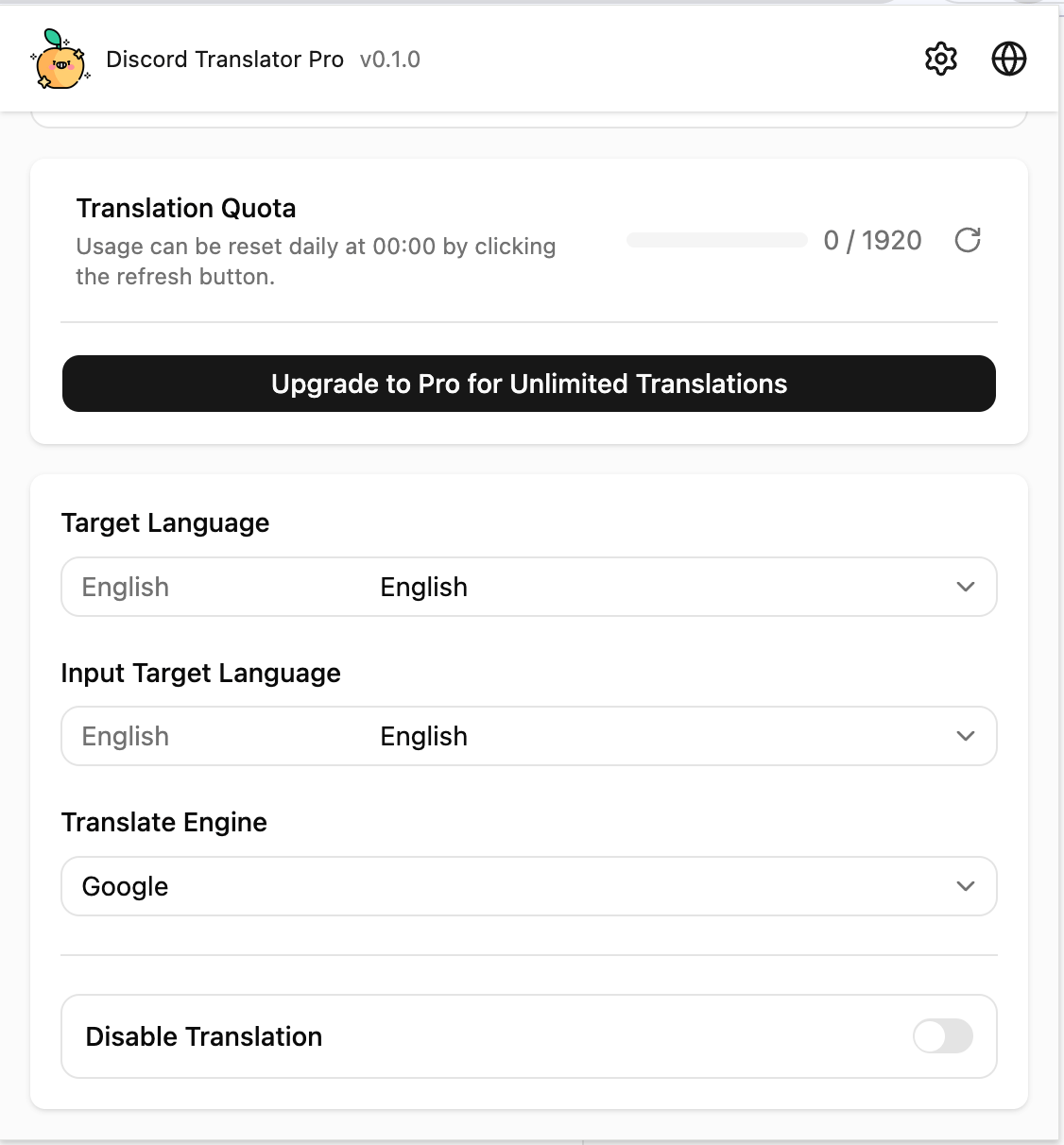 Use it to quickly change:
* `Target Language`: the language for incoming messages.
* `Input Target Language`: the language for your outgoing text.
* `Translate Engine`: currently Google.
* `Disable Translation`: temporarily turn translation off.
* `Translation Quota`: check current quota usage.
### Full Options Page
Click the settings icon in the popup, or open Options from the browser extension menu.
Use it to quickly change:
* `Target Language`: the language for incoming messages.
* `Input Target Language`: the language for your outgoing text.
* `Translate Engine`: currently Google.
* `Disable Translation`: temporarily turn translation off.
* `Translation Quota`: check current quota usage.
### Full Options Page
Click the settings icon in the popup, or open Options from the browser extension menu.
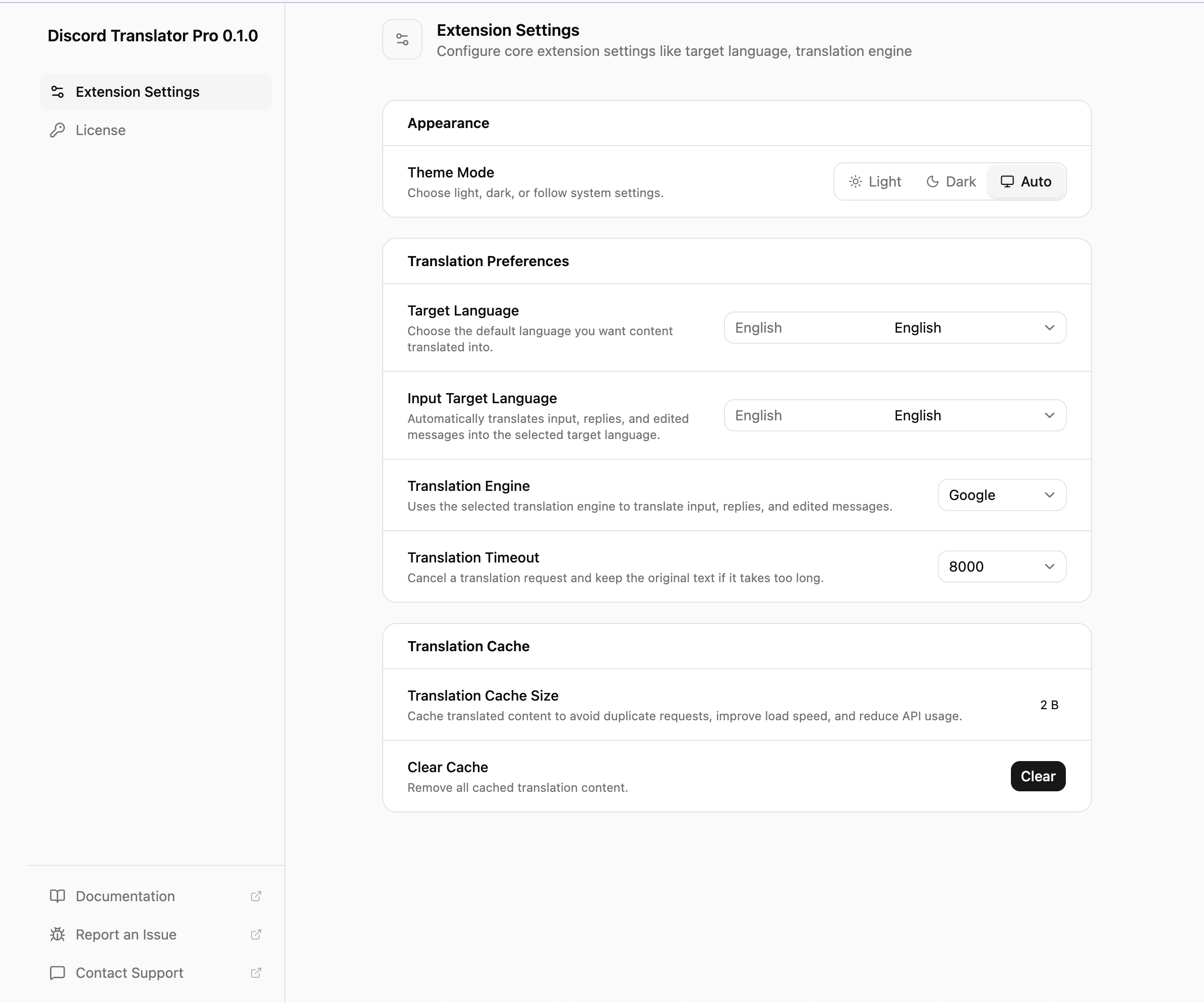 Use the full options page to manage appearance, languages, translation timeout, and cache. For first-time setup, confirm your target languages here.
### License Page
Open `License` from the left sidebar in the settings page.
Use the full options page to manage appearance, languages, translation timeout, and cache. For first-time setup, confirm your target languages here.
### License Page
Open `License` from the left sidebar in the settings page.
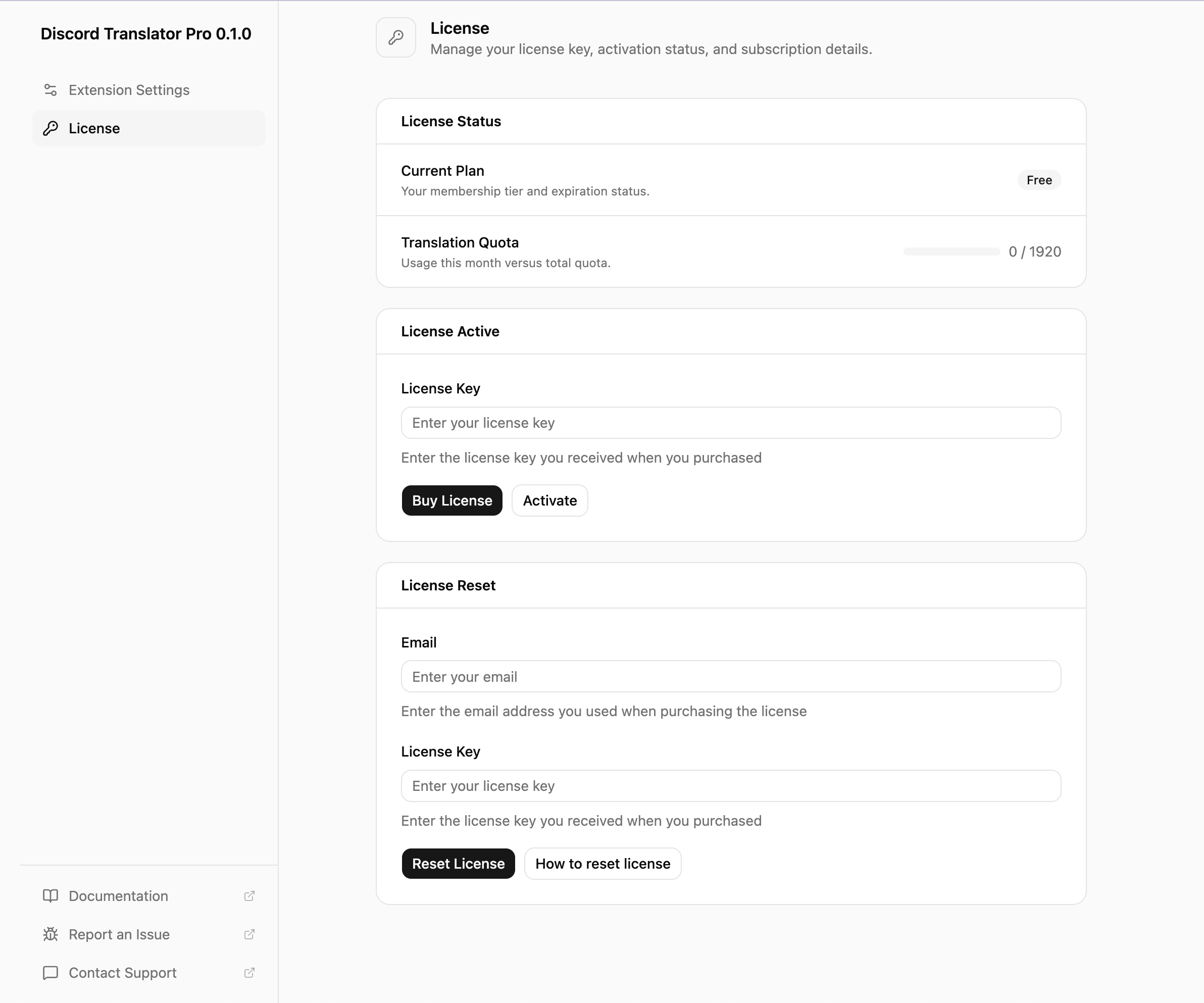 Use this page to check your plan and quota, buy a license, activate it, deactivate it, or reset it.
## Auto Translation
### 1. Open Discord Web
Go to `https://discord.com/` and open a channel, direct message, or thread.
### 2. Set Target Language
Choose your target language in the popup or full options page.
### 3. Keep Translation Enabled
Make sure `Disable Translation` is off. Return to Discord and messages will translate automatically.
> Auto translation only changes your local view. It does not edit Discord messages or affect other users.
## Quick Input Translation
### 1. Set Input Target Language
Choose the language you want to send.
### 2. Type and Send
Type normally and send your message. The extension translates the content into `Input Target Language` before sending.
> Input translation affects the actual text sent to Discord. If you only want local reading translation, do not rely on input translation for sending.
## Translation Cache
The extension caches translated text so repeated content loads faster.
If a translation looks outdated, open the full options page, click `Clear Cache`, then refresh Discord Web.
## Troubleshooting
### Messages Are Not Translating
Check:
* You are using Discord Web.
* `Disable Translation` is off.
* The free quota has not been used up.
* Your network can access the translation service.
* Discord Web may need a refresh.
### Outgoing Text Is Not Translating
Check:
* `Input Target Language` is set.
* The input is not empty.
* The free quota has not been used up.
* You are sending from the currently open channel or thread.
### License Activation Fails
Check that the license key is complete, your network is available, and the license belongs to Discord Translator Pro. If the license is already bound to another device, reset it from the License page first.
## Current Limits
* Supports Discord Web only.
* Google is the currently available translation engine.
* Bing and DeepL are not enabled yet.
* Translation quality depends on the translation service. Short messages, slang, and technical terms may need manual checking.
## Support
Use `Report an Issue` or `Contact Support` in the lower-left corner of the settings page. Include the extension version, browser, target language, and a screenshot when possible.
Use this page to check your plan and quota, buy a license, activate it, deactivate it, or reset it.
## Auto Translation
### 1. Open Discord Web
Go to `https://discord.com/` and open a channel, direct message, or thread.
### 2. Set Target Language
Choose your target language in the popup or full options page.
### 3. Keep Translation Enabled
Make sure `Disable Translation` is off. Return to Discord and messages will translate automatically.
> Auto translation only changes your local view. It does not edit Discord messages or affect other users.
## Quick Input Translation
### 1. Set Input Target Language
Choose the language you want to send.
### 2. Type and Send
Type normally and send your message. The extension translates the content into `Input Target Language` before sending.
> Input translation affects the actual text sent to Discord. If you only want local reading translation, do not rely on input translation for sending.
## Translation Cache
The extension caches translated text so repeated content loads faster.
If a translation looks outdated, open the full options page, click `Clear Cache`, then refresh Discord Web.
## Troubleshooting
### Messages Are Not Translating
Check:
* You are using Discord Web.
* `Disable Translation` is off.
* The free quota has not been used up.
* Your network can access the translation service.
* Discord Web may need a refresh.
### Outgoing Text Is Not Translating
Check:
* `Input Target Language` is set.
* The input is not empty.
* The free quota has not been used up.
* You are sending from the currently open channel or thread.
### License Activation Fails
Check that the license key is complete, your network is available, and the license belongs to Discord Translator Pro. If the license is already bound to another device, reset it from the License page first.
## Current Limits
* Supports Discord Web only.
* Google is the currently available translation engine.
* Bing and DeepL are not enabled yet.
* Translation quality depends on the translation service. Short messages, slang, and technical terms may need manual checking.
## Support
Use `Report an Issue` or `Contact Support` in the lower-left corner of the settings page. Include the extension version, browser, target language, and a screenshot when possible.